A long time ago, in an M365 tenant far, far away, legacy authentication was wide open, there were eleven Global Admins, and nobody had ever turned the audit log on.
I’ve seen this more times than I’d like to admit. You land in a new tenant, someone hands you the keys, and you spend the next 40 minutes clicking through six different admin centres trying to build a picture of what state the place is actually in. It’s the IT equivalent of flying into the Mos Eisley cantina — you don’t know what you’re dealing with until you’re already in the middle of it.
So I wrote a script.
It connects to your tenant, runs nine security checks, and drops a colour-coded HTML report on your desktop. Nothing gets changed. No Exchange Online connection. No PnP modules. Just Graph, a browser sign-in, and five minutes of your time.
What it checks
MFA Registration
How many of your licensed users actually have MFA set up. Authenticator app, phone number, FIDO2 key, Windows Hello — all count. A password-only account in 2026 is the Death Star exhaust port of your identity security. Small target, catastrophic result. The script tells you exactly how many you’ve got.
Global Admin Count
Flags anything over four permanent Global Admins. I’ve seen tenants with fifteen. The Emperor didn’t give everyone a red lightsaber and there’s a reason for that. Every unnecessary Global Admin is a credential compromise away from a bad day.
Legacy Authentication
This one matters more than people realise. Legacy auth — SMTP, IMAP, POP3, old ActiveSync — bypasses MFA entirely. Always has. The script first checks whether you’ve got a Conditional Access policy blocking it. If you do, it passes straight away without even looking at logs. If you don’t, it checks 30 days of sign-in data to see whether anything’s actually using it. These are not the protocols you’re looking for. Block them. Search your feelings. You know it to be true.
Unified Audit Log
Checks whether your audit pipeline is actually running, using Graph’s directory audit endpoint. I deliberately removed the Exchange Online connection from this script because Connect-ExchangeOnline has a WAM broker bug that crashes in VS Code’s embedded terminal with a NullReferenceException stack trace so long it looks like Order 66 was executed in your console. Graph works fine. We use Graph.
Authentication Baseline
Security Defaults and Conditional Access policies are mutually exclusive — running both is asking for trouble. This check tells you which one’s active, whether they’re conflicting, and whether you’re in a situation where authentication is completely unprotected. The prequel trilogy is what happens when nobody resolves the governance conflict early enough.
Stale Licensed Accounts
Accounts that haven’t signed in for 90 days but still have licences. You’re paying for them. They’re not being used. They’re Jar Jar Binks with a £12/month subscription — pointless, slightly annoying, and surprisingly hard to get rid of once someone’s attached feelings to the account. Disable them and reclaim the spend.
Unassigned Licences
Paid SKUs sitting idle. Worth knowing about at renewal time. The script excludes the viral Microsoft-assigned licences like FLOW_FREE and CCIBOTS_PRIVPREV_VIRAL — those show thousands of unassigned seats but they cost nothing. Microsoft adds them automatically, like midi-chlorians. We only surface the ones that are actually burning money.
External Sharing
Reads the SharePoint and OneDrive tenant-level sharing config directly from Graph. Anonymous Anyone links come back Red. If anyone with the link can access your files without signing in, that’s not a sharing setting — that’s the information leak that blew up the Death Star. Authenticated external sharing is Amber. Off entirely is Green.
Guest Invite Settings
Who can invite guests into the tenant. “Everyone” is Red — you wouldn’t let any random smuggler dock without clearance, and the same logic applies to your Entra directory. Admins and designated inviters is Amber. Admins only is Green.
The output
Self-contained HTML file. No CDN, no external assets, works offline. Opens automatically when the script finishes.
Below screenshot is of my own Tenant.
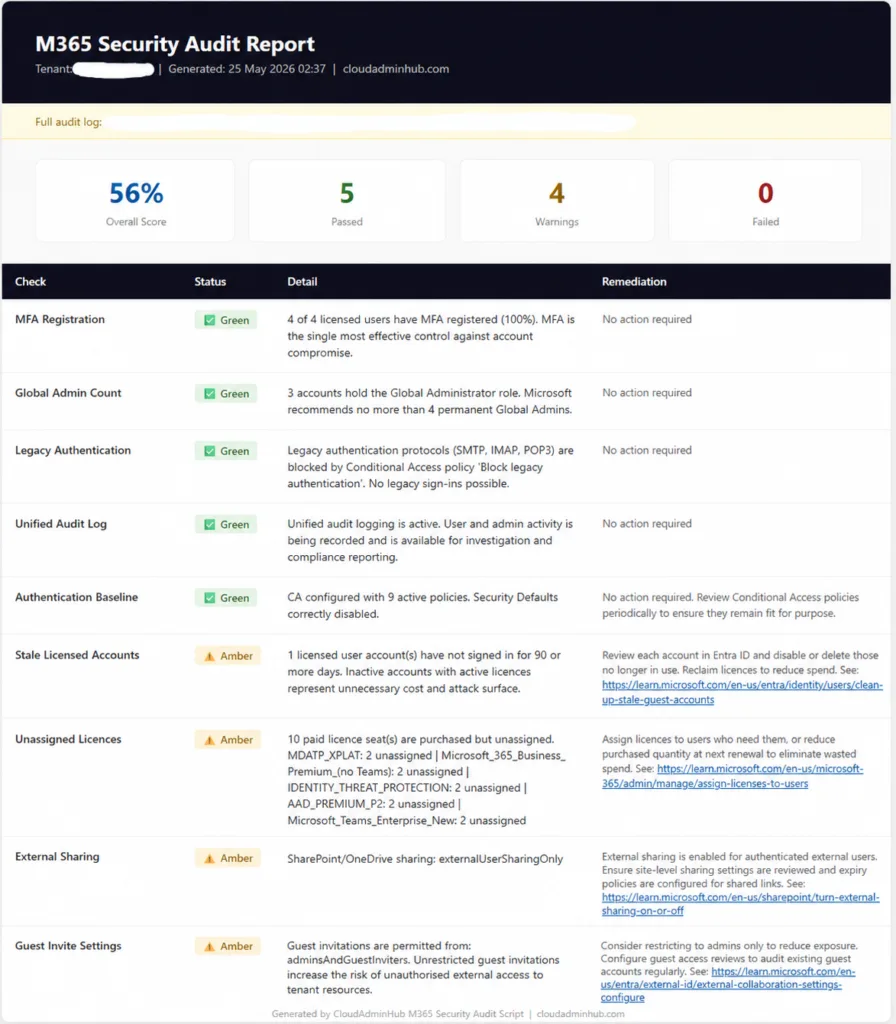
Score at the top, one row per check, status badge, what was found, and a Microsoft Learn link for anything that needs fixing. The links open in a new tab.
Save it. It’s your Holocron — a timestamped record of exactly where the tenant stood before you did anything. If something goes wrong six months later, that report is your proof it was already broken when you arrived.
Prerequisites
Install-Module Microsoft.Graph -Scope CurrentUser
That’s it. No Exchange Online module. No PnP. The path to the Dark Side is many modules — we travel light.
You need Global Reader as a minimum. The SharePoint external sharing check also needs SharePoint Administrator — without it that row comes back Amber with a note rather than actually reading your sharing settings. Assign the role in Entra ID before you run if you want the full picture.
PowerShell 7 or later. The script uses $IsWindows, $IsMacOS, and $IsLinux — these don’t exist in Windows PowerShell 5.
The script
Full script copy it below.
<#
.SYNOPSIS
M365 Tenant Security Audit Script — Read Only
CloudAdminHub.com
.DESCRIPTION
Read-only audit of Microsoft 365 tenant security posture across 9 checks.
No changes are made to the tenant. Uses Microsoft Graph only — no Exchange Online dependency.
Outputs a self-contained HTML report and a detailed log file.
.NOTES
Required modules: Microsoft.Graph
Required roles: Global Reader + UserAuthenticationMethod.Read.All + SharePoint Administrator
.EXAMPLE
.\365Audit.ps1
#>
param(
[string]$OutputPath = ""
)
# ── PATHS ────────────────────────────────────────────────────────────────────
$DesktopPath = if ($IsWindows) {
[System.Environment]::GetFolderPath('Desktop')
} elseif ($IsMacOS -or $IsLinux) {
$c = Join-Path $HOME "Desktop"
if (Test-Path $c) { $c } else { $HOME }
} else { $HOME }
if (-not $OutputPath) {
$OutputPath = Join-Path $DesktopPath "M365-Security-Audit-$(Get-Date -Format 'yyyy-MM-dd').html"
}
$LogPath = Join-Path $DesktopPath "M365-Audit-Log-$(Get-Date -Format 'yyyy-MM-dd-HHmm').txt"
# ── LOGGING ──────────────────────────────────────────────────────────────────
function Write-Log {
param([string]$Message, [string]$Level = "INFO")
$entry = "[$(Get-Date -Format 'HH:mm:ss')] [$Level] $Message"
Add-Content -Path $LogPath -Value $entry
switch ($Level) {
"ERROR" { Write-Host $entry -ForegroundColor Red }
"WARN" { Write-Host $entry -ForegroundColor Yellow }
"OK" { Write-Host $entry -ForegroundColor Green }
default { Write-Host $entry -ForegroundColor Cyan }
}
}
Write-Log "=== M365 Security Audit Started ==="
Write-Log "Platform: $(if ($IsWindows) { 'Windows' } elseif ($IsMacOS) { 'macOS' } else { 'Linux' })"
Write-Log "PowerShell version: $($PSVersionTable.PSVersion)"
Write-Log "Log file: $LogPath"
Write-Log "Report: $OutputPath"
# ── RESULTS ──────────────────────────────────────────────────────────────────
$results = [System.Collections.Generic.List[PSCustomObject]]::new()
function Add-Result {
param($Check, $Status, $Detail, $Remediation)
$results.Add([PSCustomObject]@{
Check = $Check
Status = $Status
Detail = $Detail
Remediation = $Remediation
})
$lvl = switch ($Status) { "Red" { "ERROR" } "Amber" { "WARN" } default { "OK" } }
Write-Log "$Check — $Status — $Detail" $lvl
}
function Add-FailedResult {
param($Check, $ErrorMessage)
$results.Add([PSCustomObject]@{
Check = $Check
Status = "Amber"
Detail = "Check could not complete — see log"
Remediation = "Error: $ErrorMessage"
})
Write-Log "$Check failed: $ErrorMessage" "ERROR"
}
# ── MODULE CHECK ─────────────────────────────────────────────────────────────
Write-Log "Checking required modules..."
if (-not (Get-Module -ListAvailable -Name "Microsoft.Graph")) {
Write-Log "Microsoft.Graph not found — install with: Install-Module Microsoft.Graph -Scope CurrentUser" "WARN"
} else {
Write-Log "Module available: Microsoft.Graph" "OK"
}
# ── CONNECT: MICROSOFT GRAPH ─────────────────────────────────────────────────
Write-Log "Connecting to Microsoft Graph..."
try {
Connect-MgGraph -Scopes `
"User.Read.All",
"Directory.Read.All",
"Policy.Read.All",
"AuditLog.Read.All",
"Organization.Read.All",
"RoleManagement.Read.Directory",
"UserAuthenticationMethod.Read.All",
"SharePointTenantSettings.Read.All" `
-NoWelcome -ErrorAction Stop
Write-Log "Microsoft Graph connected" "OK"
}
catch {
Write-Log "Failed to connect to Microsoft Graph: $($_.Exception.Message)" "ERROR"
exit 1
}
# ── TENANT INFO ───────────────────────────────────────────────────────────────
try {
$tenantInfo = Get-MgOrganization -ErrorAction Stop | Select-Object -First 1
Write-Log "Tenant: $($tenantInfo.DisplayName)" "OK"
}
catch {
$tenantInfo = [PSCustomObject]@{
DisplayName = "Unknown Tenant"
VerifiedDomains = @([PSCustomObject]@{ Name = "unknown.onmicrosoft.com"; IsInitial = $true })
}
}
# ── CHECK 1: MFA REGISTRATION ─────────────────────────────────────────────────
Write-Log "--- Check 1: MFA Registration ---"
try {
$licensedUsers = Get-MgUser -Filter "accountEnabled eq true" -All `
-Property Id,UserPrincipalName,AssignedLicenses -ErrorAction Stop |
Where-Object { $_.AssignedLicenses.Count -gt 0 }
$total = $licensedUsers.Count
$mfaOk = 0
foreach ($u in $licensedUsers) {
try {
$methods = Get-MgUserAuthenticationMethod -UserId $u.Id -ErrorAction Stop
$hasMfa = $methods | Where-Object {
$_.AdditionalProperties['@odata.type'] -in @(
'#microsoft.graph.microsoftAuthenticatorAuthenticationMethod',
'#microsoft.graph.phoneAuthenticationMethod',
'#microsoft.graph.fido2AuthenticationMethod',
'#microsoft.graph.windowsHelloForBusinessAuthenticationMethod'
)
}
if ($hasMfa) { $mfaOk++ }
} catch {}
}
$pct = if ($total -gt 0) { [math]::Round(($mfaOk / $total) * 100, 1) } else { 0 }
$status = if ($pct -ge 95) { "Green" } elseif ($pct -ge 80) { "Amber" } else { "Red" }
Add-Result "MFA Registration" $status `
"$mfaOk of $total licensed users have MFA registered ($pct%). MFA is the single most effective control against account compromise." `
$(if ($status -ne "Green") { "Enforce MFA for all users via a Conditional Access policy. See: https://learn.microsoft.com/en-us/entra/identity/conditional-access/howto-conditional-access-policy-all-users-mfa" } else { "No action required" })
}
catch { Add-FailedResult "MFA Registration" $_.Exception.Message }
# ── CHECK 2: GLOBAL ADMIN COUNT ───────────────────────────────────────────────
Write-Log "--- Check 2: Global Admin Count ---"
try {
$gaRole = Get-MgDirectoryRole -Filter "displayName eq 'Global Administrator'" -ErrorAction Stop
$gaMembers = Get-MgDirectoryRoleMember -DirectoryRoleId $gaRole.Id -ErrorAction Stop
$gaCount = $gaMembers.Count
$status = if ($gaCount -le 4) { "Green" } elseif ($gaCount -le 8) { "Amber" } else { "Red" }
Add-Result "Global Admin Count" $status `
"$gaCount accounts hold the Global Administrator role. Microsoft recommends no more than 4 permanent Global Admins." `
$(if ($status -ne "Green") { "Reduce permanent Global Admin assignments to 2–4. Use Privileged Identity Management (PIM) for just-in-time elevation. See: https://learn.microsoft.com/en-us/entra/id-governance/privileged-identity-management/pim-configure" } else { "No action required" })
}
catch { Add-FailedResult "Global Admin Count" $_.Exception.Message }
# ── CHECK 3: LEGACY AUTHENTICATION ───────────────────────────────────────────
Write-Log "--- Check 3: Legacy Authentication ---"
try {
$blockPolicy = Get-MgIdentityConditionalAccessPolicy -ErrorAction Stop | Where-Object {
$_.State -eq "enabled" -and (
$_.Conditions.ClientAppTypes -contains "exchangeActiveSync" -or
$_.Conditions.ClientAppTypes -contains "other"
)
}
if ($blockPolicy) {
$name = ($blockPolicy | Select-Object -First 1).DisplayName
Add-Result "Legacy Authentication" "Green" `
"Legacy authentication protocols (SMTP, IMAP, POP3) are blocked by Conditional Access policy '$name'. No legacy sign-ins possible." "No action required"
}
else {
$since = (Get-Date).AddDays(-30).ToString("yyyy-MM-ddTHH:mm:ssZ")
$legacy = Get-MgAuditLogSignIn -Filter `
"createdDateTime ge $since and clientAppUsed ne 'Browser' and clientAppUsed ne 'Mobile Apps and Desktop clients'" `
-Top 1 -ErrorAction Stop
$status = if ($null -eq $legacy) { "Green" } else { "Red" }
Add-Result "Legacy Authentication" $status `
$(if ($status -eq "Green") { "No legacy authentication sign-ins detected in the last 30 days. Consider creating a CA policy to explicitly block these protocols." } else { "Legacy authentication sign-ins detected in the last 30 days and no blocking Conditional Access policy exists. These protocols bypass MFA entirely." }) `
$(if ($status -ne "Green") { "Create a Conditional Access policy to block legacy authentication for all users. See: https://learn.microsoft.com/en-us/entra/identity/conditional-access/howto-conditional-access-policy-block-legacy" } else { "No action required" })
}
}
catch { Add-FailedResult "Legacy Authentication" $_.Exception.Message }
# ── CHECK 4: UNIFIED AUDIT LOG (via Graph) ────────────────────────────────────
Write-Log "--- Check 4: Unified Audit Log ---"
try {
# If Graph can return directory audit entries, the unified audit pipeline is active.
# This avoids an Exchange Online dependency entirely.
$auditSample = Get-MgAuditLogDirectoryAudit -Top 1 -ErrorAction Stop
$status = if ($null -ne $auditSample) { "Green" } else { "Amber" }
Add-Result "Unified Audit Log" $status `
$(if ($status -eq "Green") { "Unified audit logging is active. User and admin activity is being recorded and is available for investigation and compliance reporting." } else { "No audit events returned. Unified audit logging may be disabled or was recently enabled and has no events yet." }) `
$(if ($status -ne "Green") { "Enable Unified Audit Logging in the Microsoft Purview compliance portal. See: https://learn.microsoft.com/en-us/purview/audit-log-enable-disable" } else { "No action required" })
}
catch { Add-FailedResult "Unified Audit Log" $_.Exception.Message }
# ── CHECK 5: AUTHENTICATION BASELINE ─────────────────────────────────────────
Write-Log "--- Check 5: Authentication Baseline ---"
try {
$secDef = Get-MgPolicyIdentitySecurityDefaultEnforcementPolicy -ErrorAction Stop
$sdOn = $secDef.IsEnabled
$caActive = (Get-MgIdentityConditionalAccessPolicy -ErrorAction Stop |
Where-Object { $_.State -eq "enabled" }).Count
$status = if (-not $sdOn -and $caActive -gt 0) { "Green" }
elseif ($sdOn -and $caActive -eq 0) { "Amber" }
elseif (-not $sdOn -and $caActive -eq 0) { "Red" }
else { "Amber" }
$detail = switch ($status) {
"Green" { "CA configured with $caActive active policies. Security Defaults correctly disabled." }
"Red" { "Security Defaults OFF and no CA policies — authentication is unprotected." }
default { if ($sdOn) { "Security Defaults on alongside $caActive CA policies — potential conflict." }
else { "Security Defaults disabled, no CA policies found." } }
}
Add-Result "Authentication Baseline" $status $detail `
$(if ($status -eq "Green") { "No action required. Review Conditional Access policies periodically to ensure they remain fit for purpose." }
elseif ($status -eq "Red") { "Your tenant has no authentication protection in place. Enable Security Defaults immediately or deploy Conditional Access policies. See: https://learn.microsoft.com/en-us/entra/fundamentals/security-defaults" }
else { "Resolve the conflict between Security Defaults and Conditional Access. Disable Security Defaults when using CA policies. See: https://learn.microsoft.com/en-us/entra/identity/conditional-access/concept-conditional-access-security-defaults" })
}
catch { Add-FailedResult "Authentication Baseline" $_.Exception.Message }
# ── CHECK 6: STALE ACCOUNTS ───────────────────────────────────────────────────
Write-Log "--- Check 6: Stale Licensed Accounts ---"
try {
$stale = Get-MgUser -Filter "accountEnabled eq true" -All `
-Property Id,UserPrincipalName,SignInActivity,AssignedLicenses -ErrorAction Stop |
Where-Object {
$_.AssignedLicenses.Count -gt 0 -and (
$null -eq $_.SignInActivity.LastSignInDateTime -or
$_.SignInActivity.LastSignInDateTime -lt (Get-Date).AddDays(-90)
)
}
$count = $stale.Count
$status = if ($count -eq 0) { "Green" } elseif ($count -le 5) { "Amber" } else { "Red" }
Add-Result "Stale Licensed Accounts" $status `
"$count licensed user account(s) have not signed in for 90 or more days. Inactive accounts with active licences represent unnecessary cost and attack surface." `
$(if ($count -gt 0) { "Review each account in Entra ID and disable or delete those no longer in use. Reclaim licences to reduce spend. See: https://learn.microsoft.com/en-us/entra/identity/users/clean-up-stale-guest-accounts" } else { "No action required" })
}
catch { Add-FailedResult "Stale Licensed Accounts" $_.Exception.Message }
# ── CHECK 7: UNASSIGNED LICENCES ─────────────────────────────────────────────
Write-Log "--- Check 7: Unassigned Licences ---"
try {
# Exclude viral/free/system SKUs — not real licence spend
$exclude = @("FLOW_FREE","CCIBOTS_PRIVPREV_VIRAL","WINDOWS_STORE","RMSBASIC","Microsoft365_Lighthouse")
$total = 0
$details = @()
foreach ($sku in (Get-MgSubscribedSku -ErrorAction Stop)) {
if ($exclude -contains $sku.SkuPartNumber) { continue }
$unused = $sku.PrepaidUnits.Enabled - $sku.ConsumedUnits
if ($unused -gt 0) {
$total += $unused
$details += "$($sku.SkuPartNumber): $unused unassigned"
}
}
$status = if ($total -eq 0) { "Green" } elseif ($total -le 10) { "Amber" } else { "Red" }
Add-Result "Unassigned Licences" $status `
"$total paid licence seat(s) are purchased but unassigned. $(if ($details) { $details -join ' | ' } else { 'None' })" `
$(if ($total -gt 0) { "Assign licences to users who need them, or reduce purchased quantity at next renewal to eliminate wasted spend. See: https://learn.microsoft.com/en-us/microsoft-365/admin/manage/assign-licenses-to-users" } else { "No action required" })
}
catch { Add-FailedResult "Unassigned Licences" $_.Exception.Message }
# ── CHECK 8: EXTERNAL SHARING ─────────────────────────────────────────────────
Write-Log "--- Check 8: External Sharing ---"
try {
$sp = Get-MgAdminSharepointSetting -ErrorAction Stop
$sharing = $sp.SharingCapability
$status = switch ($sharing) {
{ $_ -in "everyone","ExternalUserAndGuestSharing","externalUserAndGuestSharing" } { "Red" }
{ $_ -in "externalUserSharingOnly","ExternalUserSharingOnly",
"existingExternalUserSharingOnly","ExistingExternalUserSharingOnly" } { "Amber" }
{ $_ -in "disabled","Disabled" } { "Green" }
default { "Amber" }
}
Add-Result "External Sharing" $status `
"SharePoint/OneDrive sharing: $sharing" `
$(if ($status -eq "Red") { "Anonymous 'Anyone' link sharing is enabled — files can be accessed by anyone with the link, with no authentication required. Restrict to authenticated external users as a minimum. See: https://learn.microsoft.com/en-us/sharepoint/turn-external-sharing-on-or-off" }
elseif ($status -eq "Amber") { "External sharing is enabled for authenticated external users. Ensure site-level sharing settings are reviewed and expiry policies are configured for shared links. See: https://learn.microsoft.com/en-us/sharepoint/turn-external-sharing-on-or-off" }
else { "No action required" })
}
catch {
Add-Result "External Sharing" "Amber" `
"SharePoint sharing settings could not be retrieved. The account running this script may lack the SharePoint Administrator role." `
"Assign the SharePoint Administrator role in Entra ID and re-run. See: https://learn.microsoft.com/en-us/sharepoint/sharepoint-admin-role"
}
# ── CHECK 9: GUEST INVITE SETTINGS ───────────────────────────────────────────
Write-Log "--- Check 9: Guest Invite Settings ---"
try {
$policy = Get-MgPolicyAuthorizationPolicy -ErrorAction Stop
$setting = $policy.AllowInvitesFrom
$status = switch ($setting) {
"everyone" { "Red" }
"adminsGuestInvitersAndAllMembers" { "Amber" }
"adminsAndGuestInviters" { "Amber" }
"none" { "Green" }
default { "Amber" }
}
Add-Result "Guest Invite Settings" $status `
"Guest invitations are permitted from: $setting. Unrestricted guest invitations increase the risk of unauthorised external access to tenant resources." `
$(if ($status -eq "Red") { "Restrict guest invitations immediately. Set to 'Admins and users in the guest inviter role' or 'Admins only' in Entra External Identities. See: https://learn.microsoft.com/en-us/entra/external-id/external-collaboration-settings-configure" }
elseif ($status -eq "Amber") { "Consider restricting to admins only to reduce exposure. Configure guest access reviews to audit existing guest accounts regularly. See: https://learn.microsoft.com/en-us/entra/external-id/external-collaboration-settings-configure" }
else { "No action required" })
}
catch { Add-FailedResult "Guest Invite Settings" $_.Exception.Message }
# ── DISCONNECT ────────────────────────────────────────────────────────────────
Write-Log "Disconnecting..."
try { Disconnect-MgGraph -ErrorAction SilentlyContinue | Out-Null } catch {}
Write-Log "Disconnected" "OK"
# ── BUILD HTML REPORT ─────────────────────────────────────────────────────────
Write-Log "Building HTML report..."
$greenCount = ($results | Where-Object { $_.Status -eq "Green" }).Count
$amberCount = ($results | Where-Object { $_.Status -eq "Amber" }).Count
$redCount = ($results | Where-Object { $_.Status -eq "Red" }).Count
$overallScore = [math]::Round(($greenCount / $results.Count) * 100)
# Convert plain URLs in a string to clickable HTML links that open in a new tab
function ConvertTo-HtmlLinks {
param([string]$Text)
[regex]::Replace($Text, '(https?://[^\s"<>]+)', '<a href="$1" target="_blank" style="color:#0050a0;text-decoration:underline">$1</a>')
}
$rowsHtml = foreach ($r in $results) {
$colour = switch ($r.Status) { "Green" { "#2d6a2d" } "Amber" { "#8a5c00" } "Red" { "#8a1f1f" } }
$bg = switch ($r.Status) { "Green" { "#eaf5ea" } "Amber" { "#fdf3dc" } "Red" { "#fdeaea" } }
$emoji = switch ($r.Status) { "Green" { "✅" } "Amber" { "⚠️" } "Red" { "❌" } }
$remediationHtml = ConvertTo-HtmlLinks $r.Remediation
@"
<tr>
<td style="font-weight:600">$($r.Check)</td>
<td><span style="background:$bg;color:$colour;padding:3px 10px;border-radius:4px;font-weight:600;font-size:13px;white-space:nowrap">$emoji $($r.Status)</span></td>
<td>$($r.Detail)</td>
<td style="color:#555;font-size:13px">$remediationHtml</td>
</tr>
"@
}
$html = @"
<!DOCTYPE html>
<html lang="en">
<head>
<meta charset="UTF-8">
<meta name="viewport" content="width=device-width,initial-scale=1">
<title>M365 Security Audit — $($tenantInfo.DisplayName)</title>
<style>
body{font-family:-apple-system,BlinkMacSystemFont,'Segoe UI',sans-serif;background:#f5f5f5;margin:0;padding:2rem;color:#222}
.wrap{max-width:1100px;margin:0 auto;background:#fff;border-radius:10px;box-shadow:0 2px 12px rgba(0,0,0,.08);overflow:hidden}
.hdr{background:#0f0f1e;color:#fff;padding:2rem 2.5rem}
.hdr h1{margin:0 0 .25rem;font-size:1.6rem}
.hdr p{margin:0;color:rgba(255,255,255,.6);font-size:14px}
.log{padding:.75rem 2.5rem;background:#fffbe6;border-bottom:1px solid #f0e68c;font-size:13px;color:#7a6500}
.scores{display:flex;gap:1rem;padding:1.5rem 2.5rem;background:#fafafa;border-bottom:1px solid #eee}
.card{flex:1;text-align:center;background:#fff;border-radius:8px;padding:1rem;border:1px solid #eee}
.num{font-size:2rem;font-weight:700}
.lbl{font-size:12px;color:#888;margin-top:4px}
.g{color:#2d6a2d}.a{color:#8a5c00}.r{color:#8a1f1f}.b{color:#0050a0}
table{width:100%;border-collapse:collapse}
th{background:#0f0f1e;color:#fff;padding:12px 16px;text-align:left;font-size:13px;font-weight:600}
td{padding:14px 16px;border-bottom:1px solid #f0f0f0;font-size:14px;vertical-align:top}
tr:hover td{background:#fafafa}
.ftr{padding:1rem 2.5rem;text-align:center;font-size:12px;color:#aaa;border-top:1px solid #eee}
</style>
</head>
<body>
<div class="wrap">
<div class="hdr">
<h1>M365 Security Audit Report</h1>
<p>Tenant: $($tenantInfo.DisplayName) | Generated: $(Get-Date -Format 'dd MMM yyyy HH:mm') | cloudadminhub.com</p>
</div>
<div class="log">Full audit log: $LogPath</div>
<div class="scores">
<div class="card"><div class="num b">$overallScore%</div><div class="lbl">Overall Score</div></div>
<div class="card"><div class="num g">$greenCount</div><div class="lbl">Passed</div></div>
<div class="card"><div class="num a">$amberCount</div><div class="lbl">Warnings</div></div>
<div class="card"><div class="num r">$redCount</div><div class="lbl">Failed</div></div>
</div>
<table>
<thead><tr>
<th style="width:20%">Check</th>
<th style="width:10%">Status</th>
<th style="width:35%">Detail</th>
<th style="width:35%">Remediation</th>
</tr></thead>
<tbody>$($rowsHtml -join '')</tbody>
</table>
<div class="ftr">Generated by CloudAdminHub M365 Security Audit Script | cloudadminhub.com</div>
</div>
</body>
</html>
"@
$html | Out-File -FilePath $OutputPath -Encoding UTF8
if ($IsWindows) { Start-Process $OutputPath }
elseif ($IsMacOS) { & open $OutputPath }
elseif ($IsLinux) { & xdg-open $OutputPath }
Write-Log "=== Audit Complete ===" "OK"
Write-Log "Score: $overallScore% ($greenCount passed, $amberCount warnings, $redCount failed)" "OK"
Write-Log "Report: $OutputPath" "OK"
Write-Log "Log: $LogPath" "OK"
Write-Host ""
Write-Host "Report: $OutputPath" -ForegroundColor Green
Write-Host "Log: $LogPath" -ForegroundColor Cyan
Write-Host "Score: $overallScore% ($greenCount passed / $amberCount warnings / $redCount failed)" -ForegroundColor White
The full script is available on GitHub.
Running it
& "C:\Path\To\365Audit.ps1"
A browser sign-in prompt comes up for Graph. Sign in with your admin account. The MFA check is the slow part — it calls the authentication methods API for every licensed user, one at a time. On a small tenant it’s done in under 30 seconds. On a 500-seat tenant, give it a couple of minutes.
Report opens automatically when it’s done. Log file lands on the desktop next to it, timestamped in dd-MM-yyyy-HHmm format so you can tell runs apart.
A few things
The script doesn’t touch anything in the tenant. Read-only throughout. Think of it as reconnaissance, not engagement.
The licence waste check has a built-in exclusion list for viral SKUs. If your tenant shows FLOW_FREE with 9,996 unassigned seats, that’s not a real problem — Microsoft assigns those automatically and you can’t remove them. The script knows the difference between a real threat and a Tusken Raider that turns out to be the wind.
Run it monthly. Run it on every new client. May the audit be with you.
Zahin Memon is a Microsoft 365 Architect and Modern Workplace solutions expert based in London, with years of experience designing and delivering M365 and Intune environments at enterprise scale. Find out more at zmemon.com.